Close your tabs.
Keep a backup.

탭은 닫고,
백업은 남긴다.

Choose the tabs you want, then save and close them or save them without closing. The vault stays on your device, and with file backup on, every change writes a JSON copy to Downloads/TabBunker.

원하는 탭을 고른 뒤 닫아 보관하거나, 닫지 않고 보관할 수 있습니다. 보관함은 내 기기에 있고, 파일 백업을 켜 두면 변경마다 다운로드 폴더의 TabBunker 폴더에 JSON 사본이 남습니다.

Free. Open source. No account, no server, no network requests. English and Korean UI. 무료. 오픈소스. 계정도 서버도 네트워크 요청도 없음. 한국어·영어 UI.
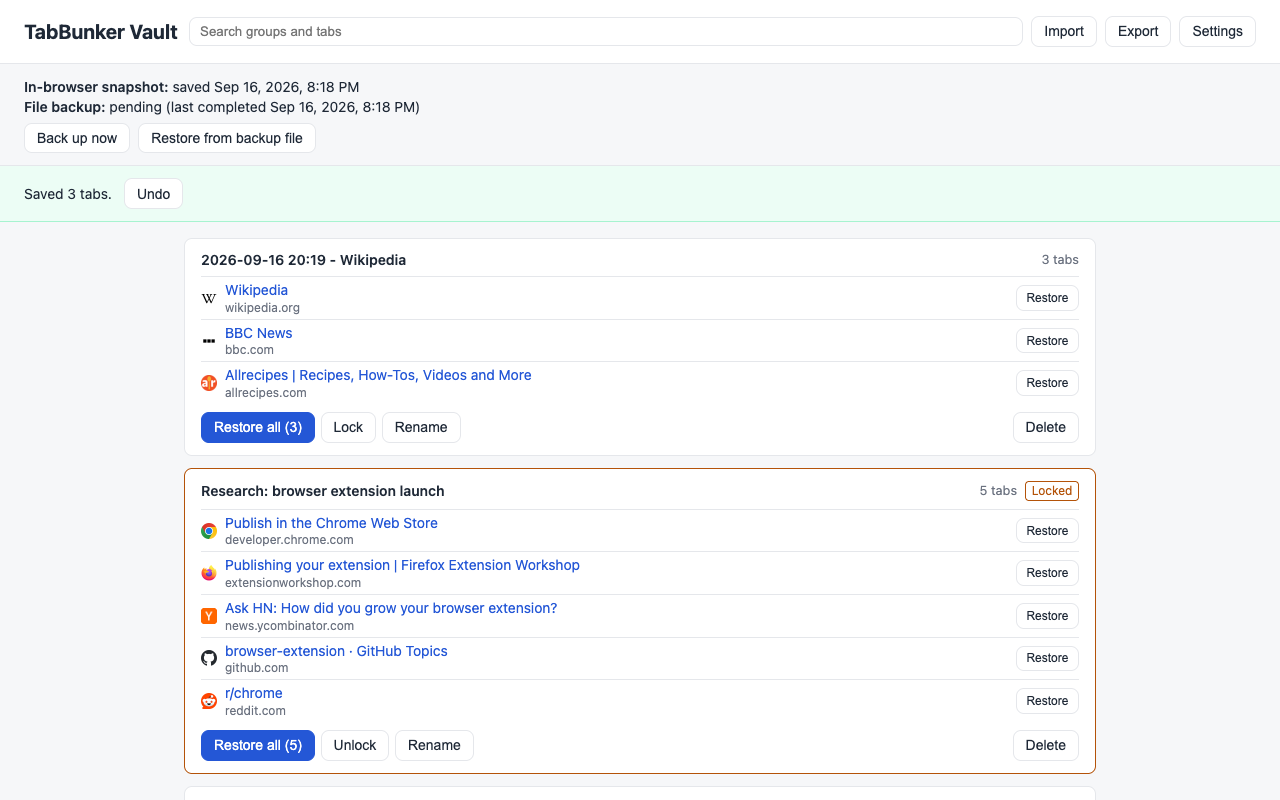
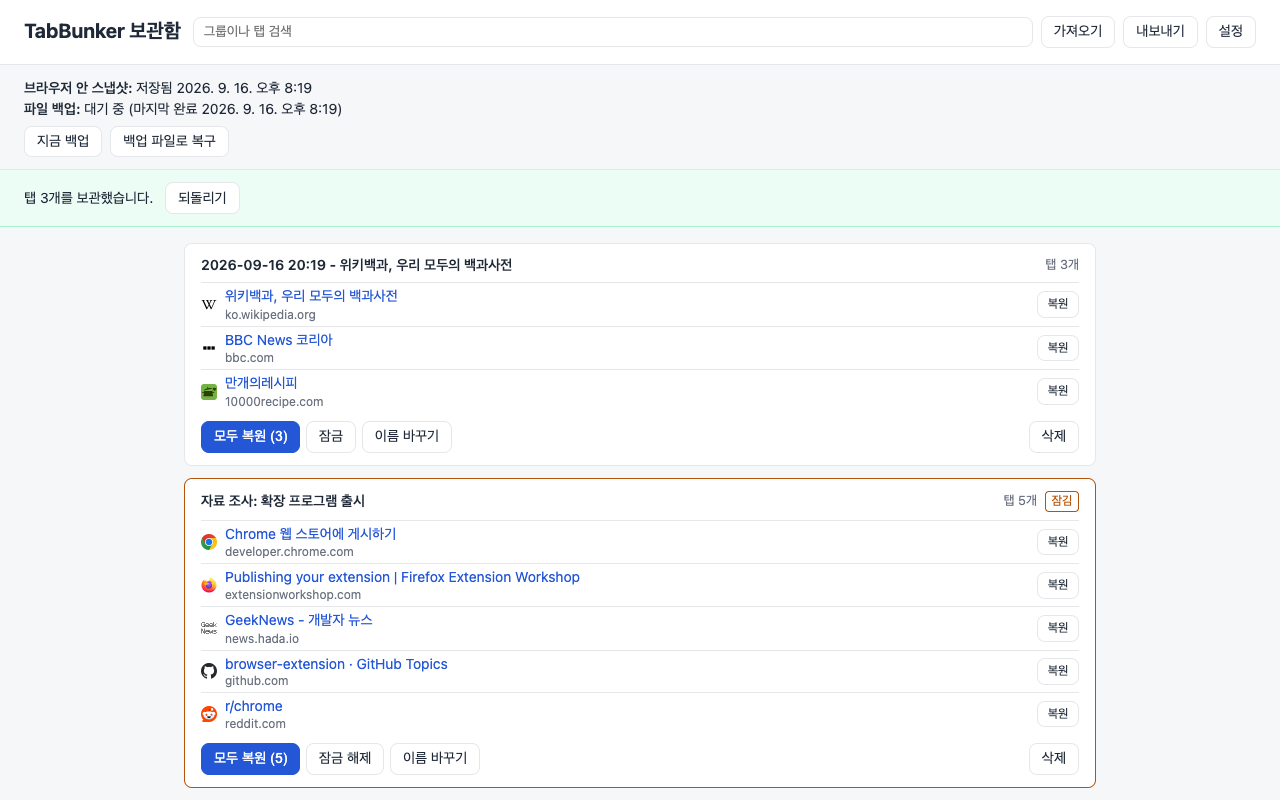
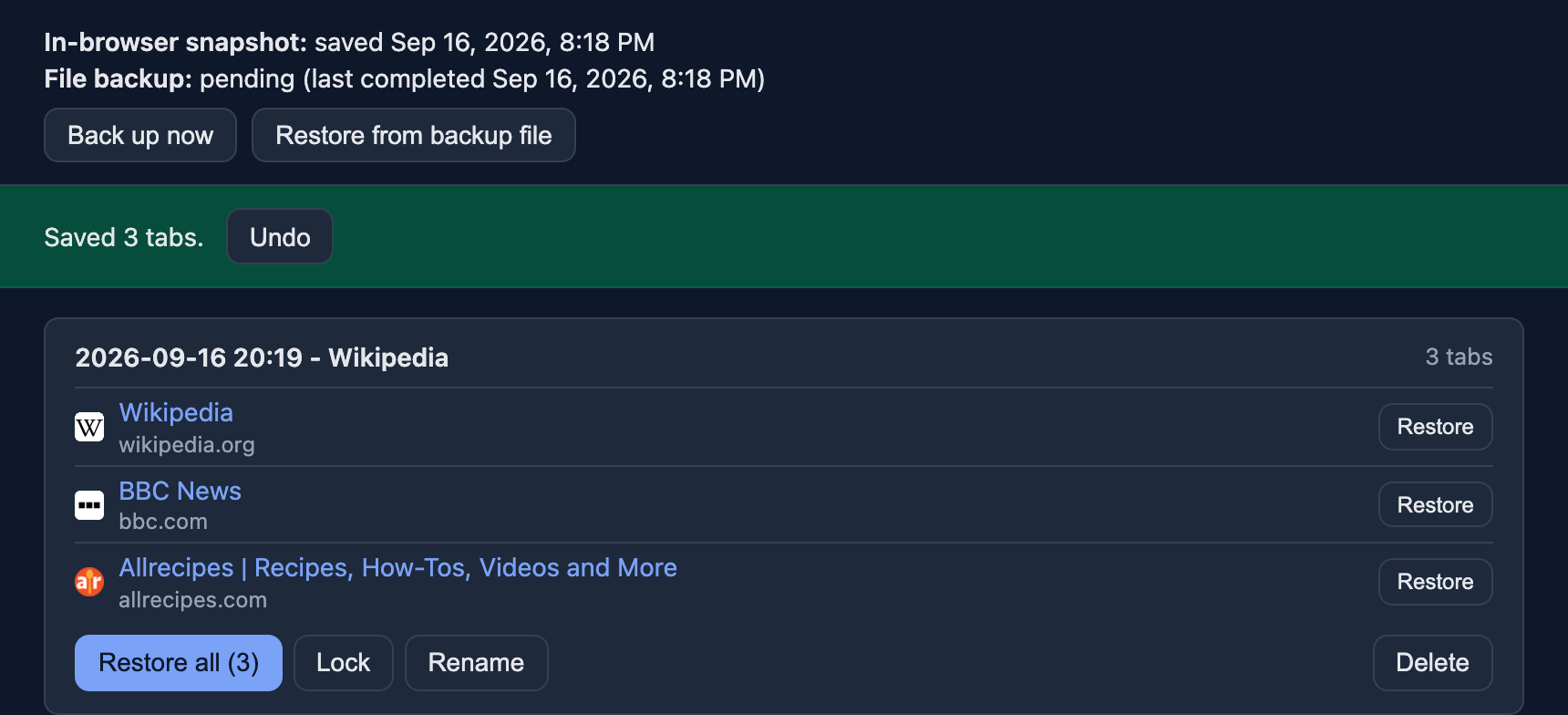
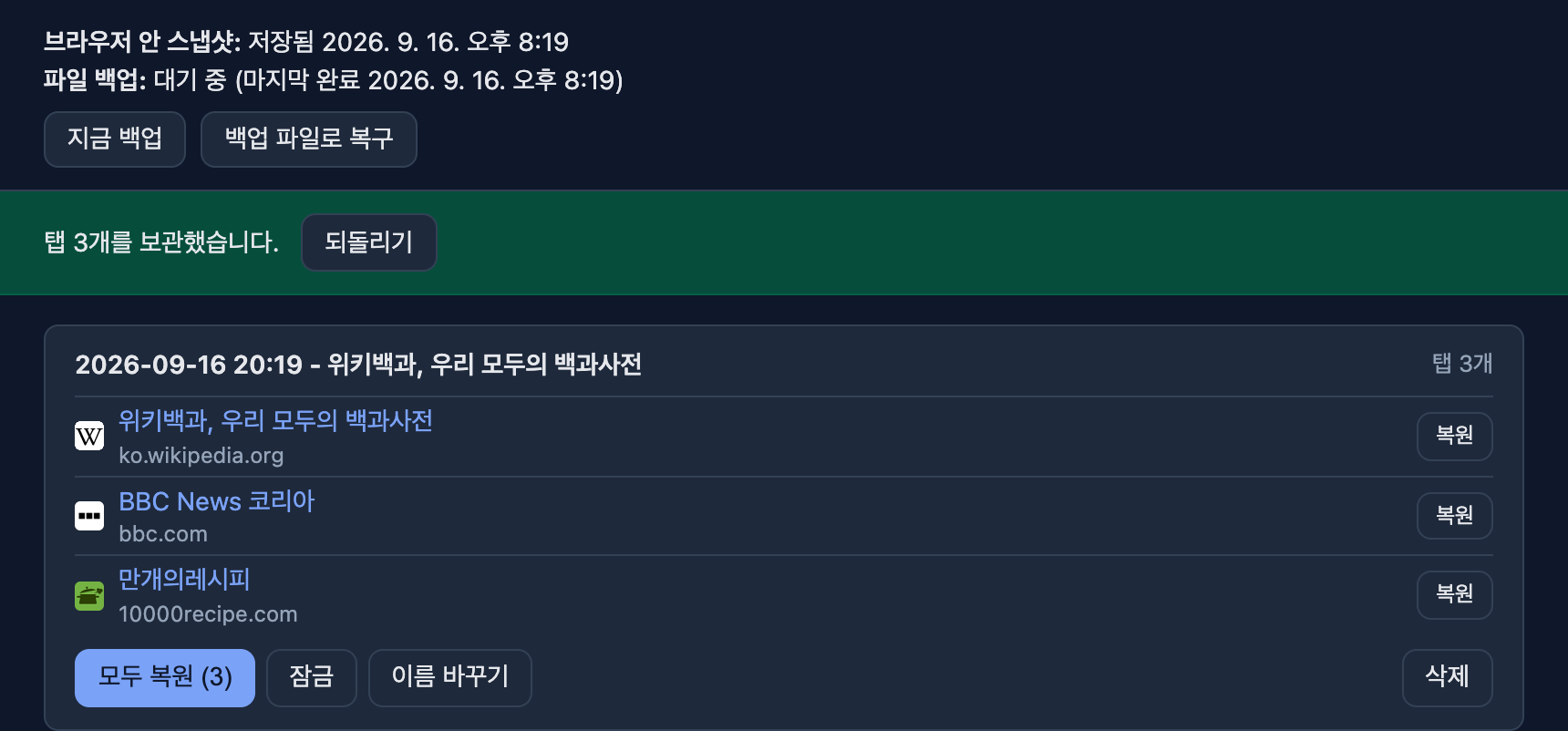
TabBunker vault right after saving three tabs, with an Undo banner and favicons 탭 3개를 보관한 직후의 TabBunker 보관함. 되돌리기 배너와 파비콘이 보인다

What happens when you open TabBunker

TabBunker를 열면 일어나는 일

Three things, in order. The third one is the reason TabBunker exists.

세 가지가 순서대로 일어납니다. 세 번째가 TabBunker를 만든 이유입니다.

1

Choose the tabs

탭을 고릅니다

The toolbar icon opens a panel for the current window. Pick the tabs you want and decide whether to close them after saving. Alt+Shift+S remains the quick action that saves and closes the current window immediately.

툴바 아이콘으로 현재 창의 선택 화면을 엽니다. 원하는 탭을 고르고, 보관 뒤 닫을지도 정합니다. Alt+Shift+S는 현재 창의 탭을 바로 닫아 보관하는 빠른 동작입니다.

2

The selection lands in the vault

고른 탭이 보관함에 들어갑니다

Their titles and URLs are saved as one group. Search, rename, lock, or restore one tab or the whole group.

고른 탭의 제목과 주소가 그룹 하나로 저장됩니다. 검색하고, 이름을 바꾸고, 잠그고, 탭 하나나 그룹 전체를 복원할 수 있습니다.

3

A snapshot, plus an optional file copy

스냅샷과 선택 가능한 파일 사본

A snapshot goes into the in-browser history (last 20). With file backup on, a JSON file is written to Downloads/TabBunker after a short delay (30 seconds by default). You can open it with any text editor.

브라우저 안 이력(최근 20개)에 스냅샷이 들어갑니다. 파일 백업을 켜 두면 잠시 뒤(기본 30초) 다운로드 폴더의 TabBunker 폴더에 JSON 파일이 생깁니다. 아무 텍스트 편집기로 열립니다.

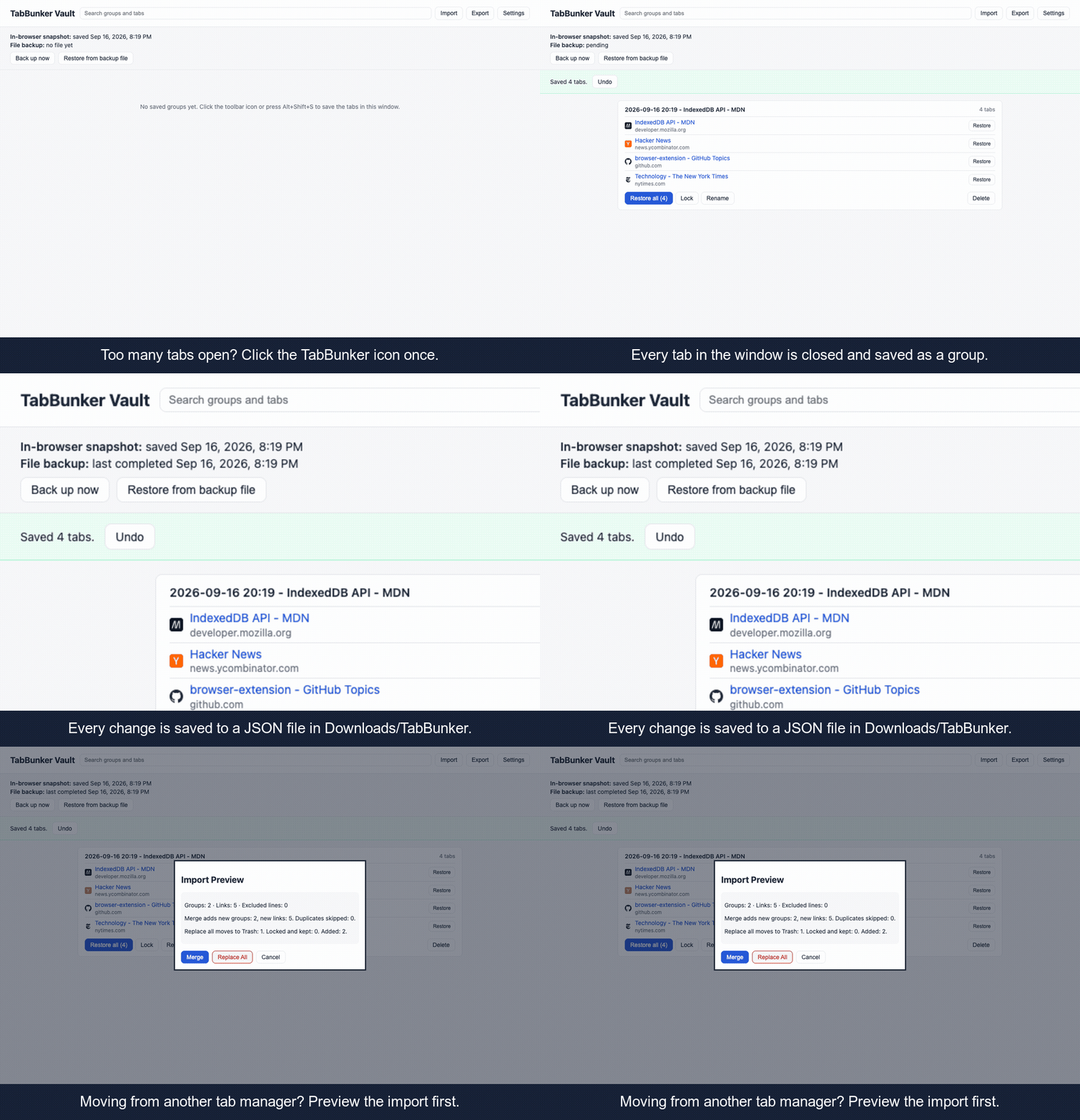
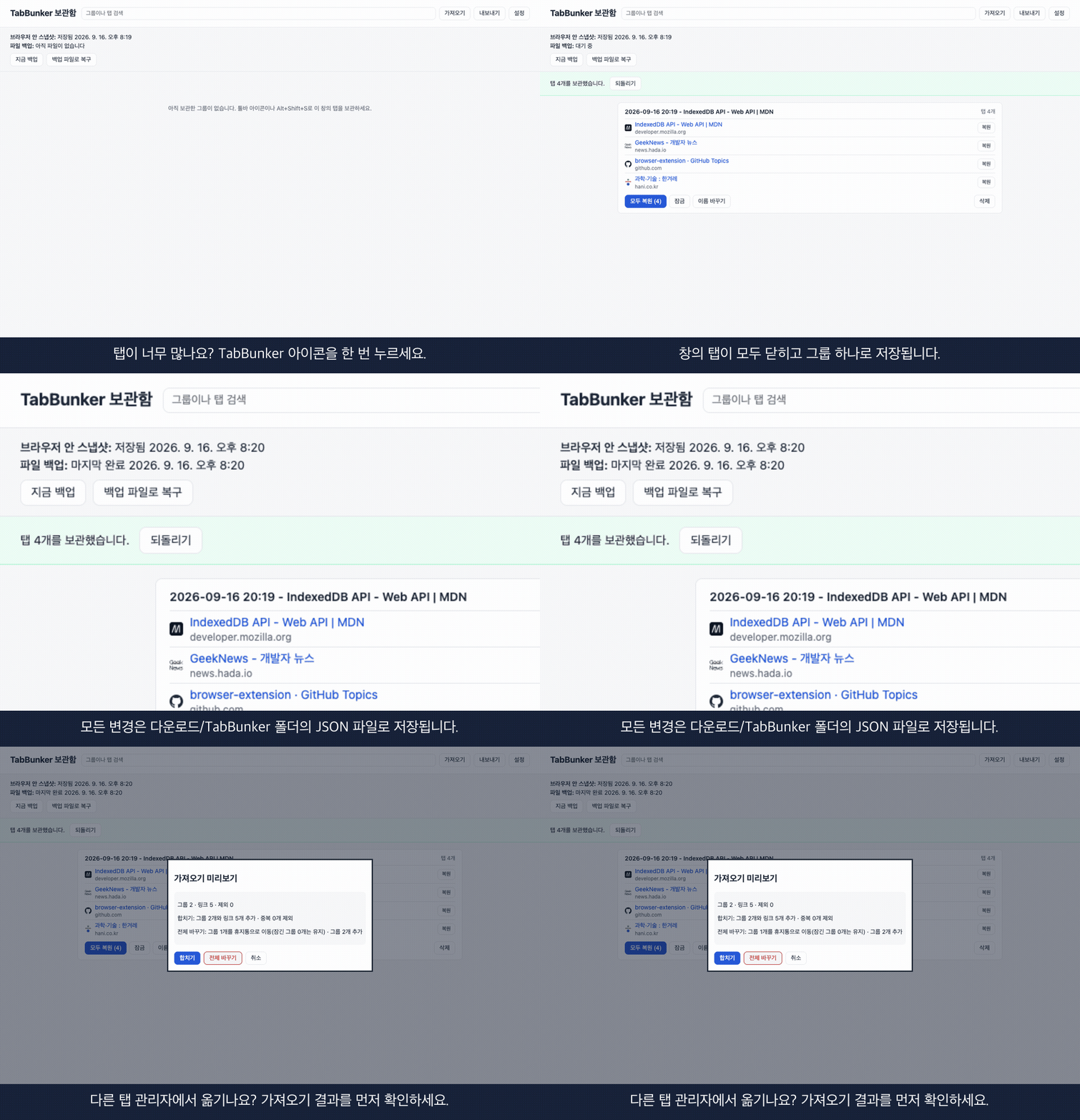
Demo: collapse tabs, backup status, import preview데모: 탭 접기, 백업 상태, 가져오기 미리보기

Why a file on disk

왜 디스크에 파일로 남기나

TabBunker keeps the working vault in browser storage and, when file backup is on, writes a separate copy to your Downloads folder after each change. Browser storage can disappear when the extension is removed or the profile is reset; the downloaded file stays unless you delete it. Reinstall, click Import, choose the file, and review the preview before applying it.

TabBunker는 작업 중인 보관함을 브라우저 저장소에 두고, 파일 백업을 켜면 변경마다 다운로드 폴더에 별도 사본을 씁니다. 브라우저 저장소는 확장을 지우거나 프로필을 초기화하면 사라질 수 있지만, 다운로드한 파일은 직접 지우지 않는 한 남습니다. 다시 설치한 뒤 가져오기에서 파일을 고르고, 적용 전에 미리보기를 확인합니다.

What it does not do. File backup is on by default; if you turn it off, no file is written. A failing disk or a deleted Downloads folder is not covered either. TabBunker makes losing your list much less likely. It does not make it impossible.
못 하는 것도 있습니다. 파일 백업은 기본으로 켜져 있지만 끄면 파일이 생기지 않습니다. 디스크 고장이나 다운로드 폴더 삭제도 막지 못합니다. TabBunker는 목록을 잃을 가능성을 크게 줄여 주는 도구이지, 불가능하게 만드는 도구는 아닙니다.

Features

기능

Real screens from the extension, not mockups.

모두 확장의 실제 화면입니다.

Choose what to save, with Undo if you change your mind

보관할 탭을 고르고, 마음이 바뀌면 되돌리기

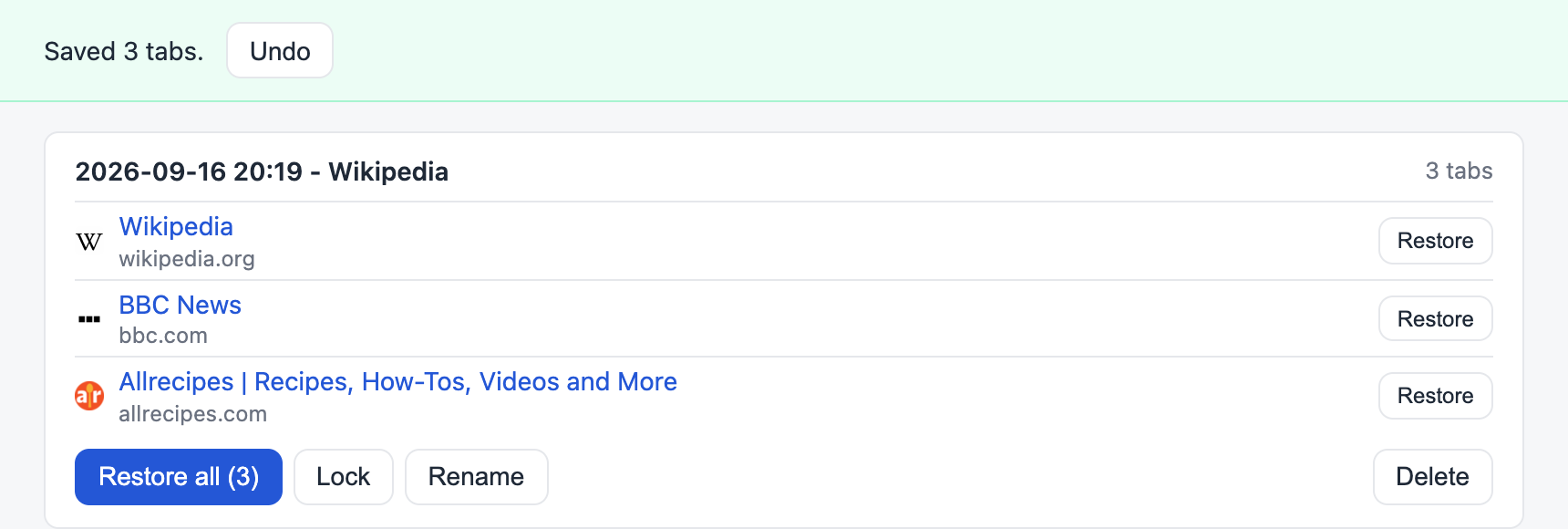
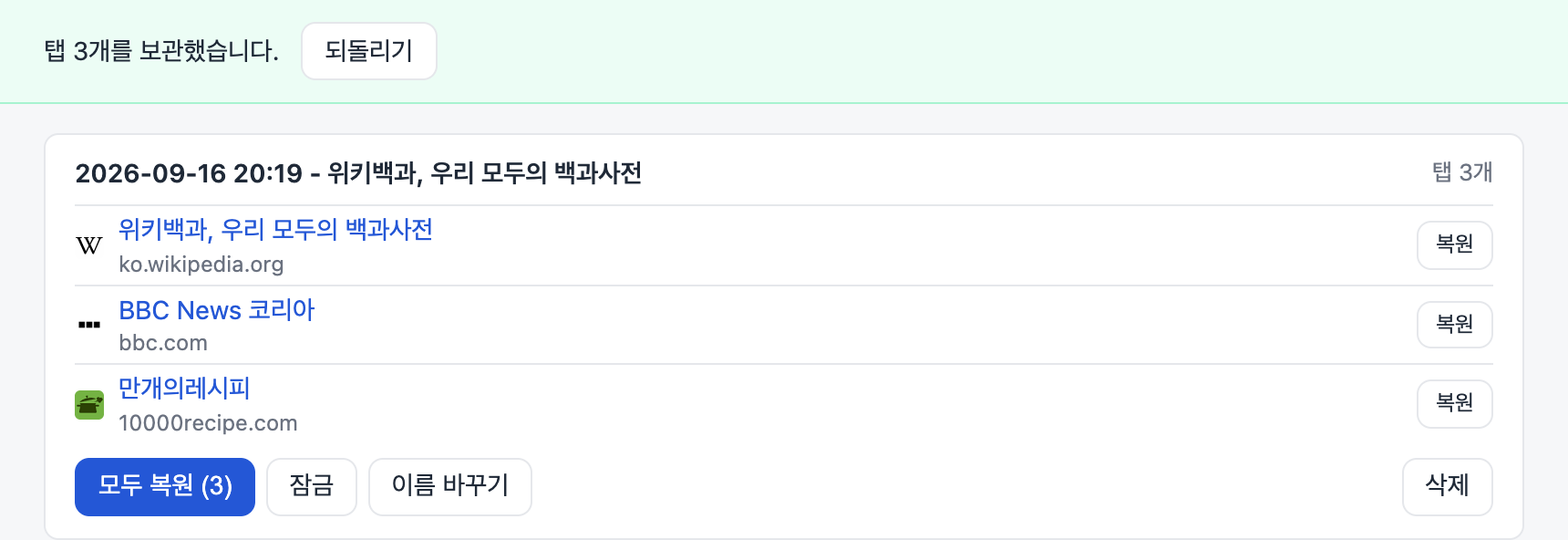
The tabs you select land in the vault as one group. If you chose to close them, a banner tells you how many were saved and offers Undo. From the right-click menu you can also send just this tab, a link, or the whole window.

고른 탭이 그룹 하나로 보관함에 들어갑니다. 닫아 보관했다면 배너가 몇 개를 보관했는지 알려 주고 되돌리기를 제공합니다. 우클릭 메뉴로 이 탭만, 링크만, 창 전체를 보낼 수도 있습니다.

Saved 3 tabs banner with Undo above the new group탭 3개를 보관했다는 배너와 되돌리기 버튼, 새로 생긴 그룹

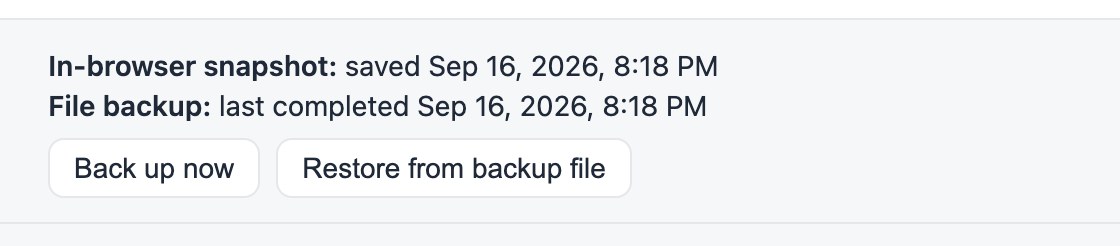
You can see when the backup was written

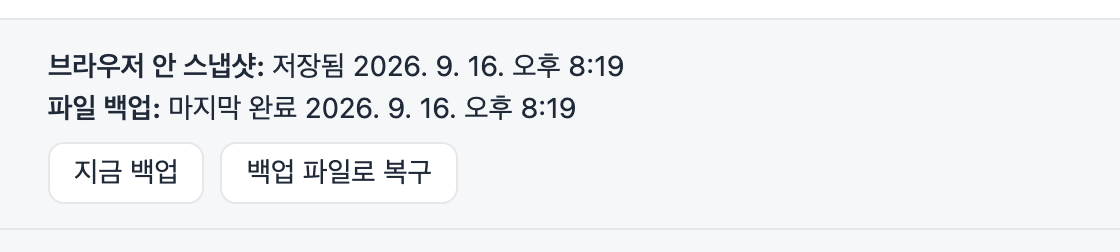
백업이 언제 쓰였는지 보입니다

The top of the vault shows the last in-browser snapshot and the last file written to Downloads/TabBunker. Back up now writes the file immediately. Restore from backup file brings a saved file back into the vault.

보관함 위쪽에 브라우저 안 스냅샷 시각과 다운로드/TabBunker 폴더에 마지막으로 파일을 쓴 시각이 보입니다. 지금 백업은 파일을 바로 쓰고, 백업 파일로 복구는 저장된 파일을 보관함으로 되돌립니다.

Backup status: in-browser snapshot and last file backup time백업 상태: 브라우저 안 스냅샷과 마지막 파일 백업 시각

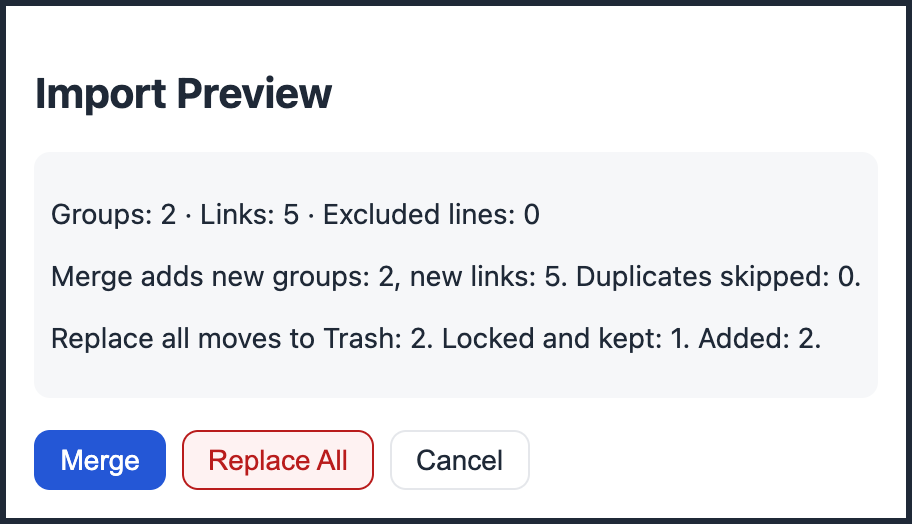
See what an import will change before it happens

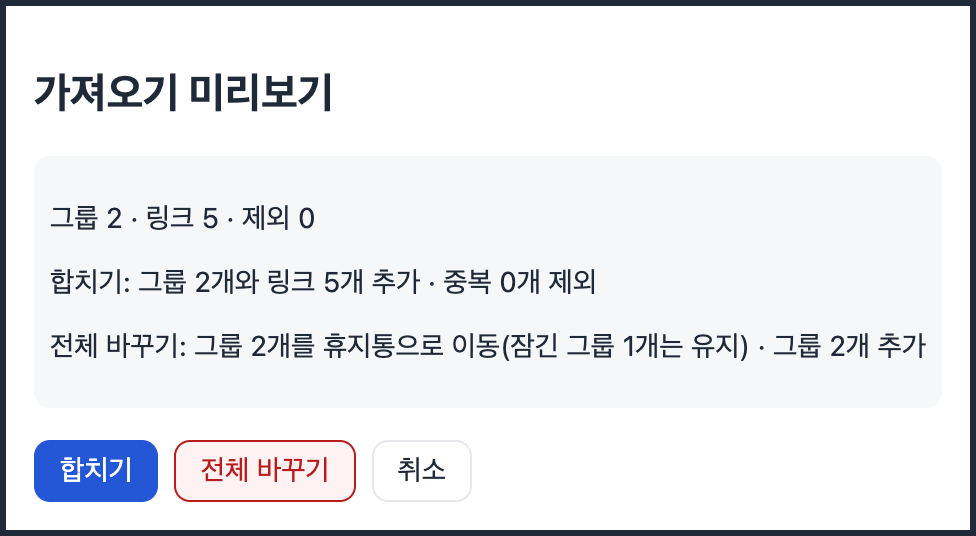
가져오기 전에 무엇이 바뀌는지 먼저 봅니다

Open an export from OneTab, Session Buddy, or a TabBunker backup. The preview counts groups, links, and skipped lines, and spells out what Merge and Replace all will do. Replace all moves existing groups to Trash instead of deleting them, and locked groups stay.

OneTab, Session Buddy 내보내기 파일이나 TabBunker 백업을 엽니다. 미리보기가 그룹·링크·제외된 줄 수를 세고, 합치기와 전체 바꾸기가 각각 무엇을 하는지 적어 줍니다. 전체 바꾸기는 기존 그룹을 지우지 않고 휴지통으로 옮기며, 잠긴 그룹은 그대로 둡니다.

Import preview dialog with Merge and Replace all합치기와 전체 바꾸기가 있는 가져오기 미리보기 창

Your folder, your schedule

폴더와 백업 간격은 직접 정합니다

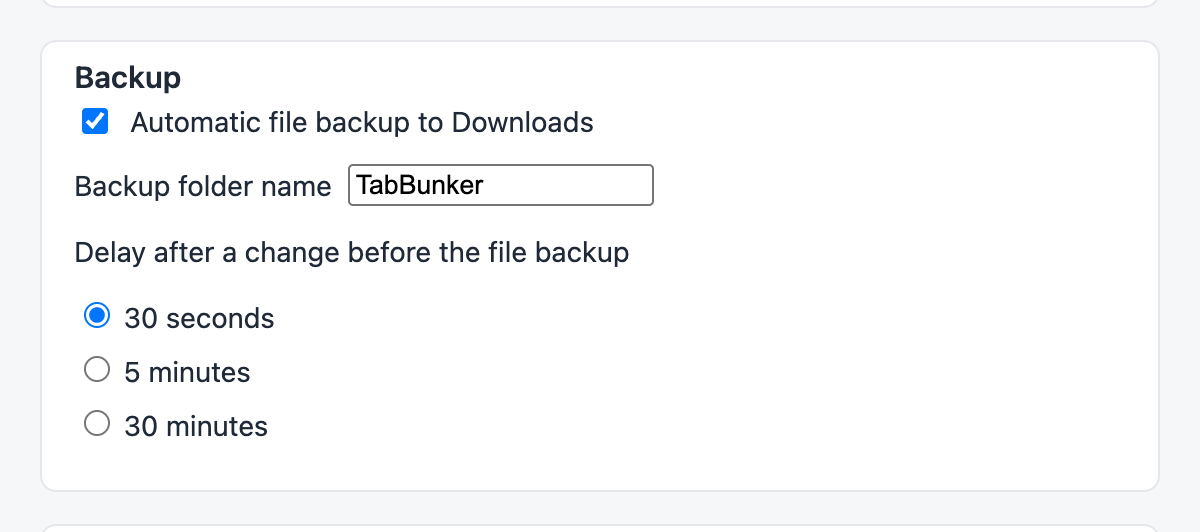
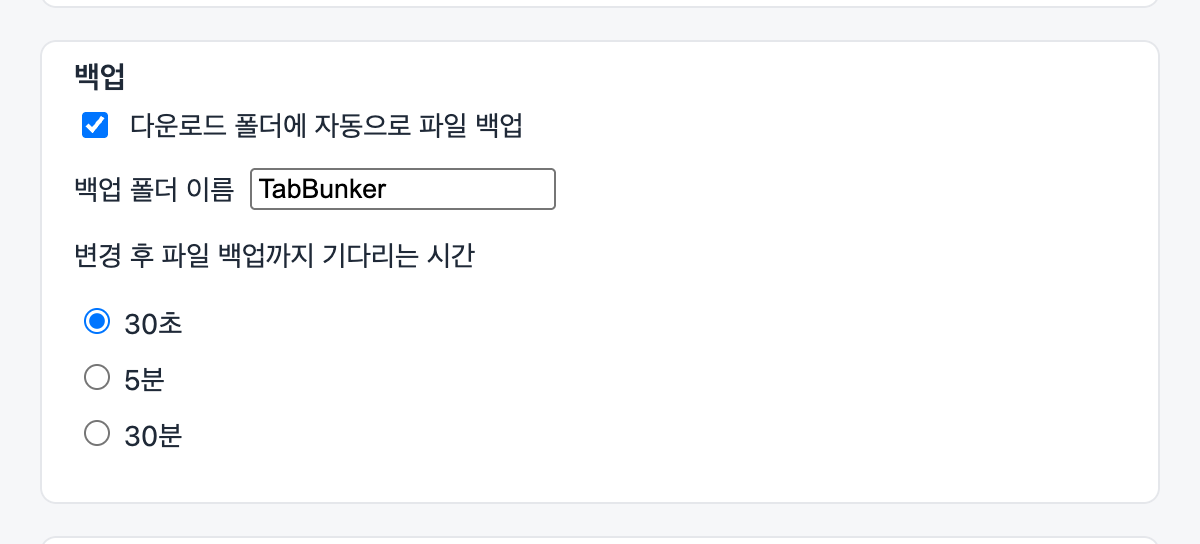
Choose the folder name inside Downloads and how long to wait after a change before writing the file: 30 seconds, 5 minutes, or 30 minutes. File backup can be turned off. Only one latest file is overwritten, plus at most one dated copy per hour with the 30 newest kept.

다운로드 폴더 안의 폴더 이름과 변경 후 파일을 쓰기까지 기다리는 시간(30초, 5분, 30분)을 고릅니다. 파일 백업을 끌 수도 있습니다. 최신 파일 하나만 덮어쓰고, 날짜 파일은 한 시간에 최대 하나씩 최근 30개만 남깁니다.

Backup settings: folder name and delay백업 설정: 폴더 이름과 대기 시간

Favicons and dark mode

파비콘과 다크 모드

Chrome shows each site's icon from the browser's own cache, so nothing is fetched from the web; Firefox shows the first letter of the domain. The vault follows your system light or dark theme.

크롬에서는 브라우저 캐시에 있는 사이트 아이콘을 보여 주므로 웹에서 아무것도 받아 오지 않습니다. 파이어폭스에서는 도메인 첫 글자를 보여 줍니다. 보관함은 시스템의 라이트·다크 테마를 따릅니다.

Vault in dark mode with favicons파비콘이 보이는 다크 모드 보관함

Search across everything

전체 검색

Type part of a title or URL and every matching tab in every group shows up.

제목이나 주소 일부만 치면 모든 그룹의 일치하는 탭이 나옵니다.

Lock, rename, drag

잠금, 이름 바꾸기, 끌어 옮기기

Lock a group so it cannot be deleted. Rename it. Drag tabs between groups.

그룹을 잠가 지워지지 않게 하고, 이름을 바꾸고, 탭을 그룹 사이로 끌어 옮깁니다.

Restore with care

신중한 복원

Restore one tab or a whole group. Groups with 30 or more tabs ask first, and links that fail to open stay in the vault.

탭 하나나 그룹 전체를 복원합니다. 30개 이상이면 먼저 묻고, 열리지 않은 링크는 보관함에 남습니다.

Export anywhere

어디로든 내보내기

TabBunker JSON, OneTab-compatible text, or an HTML bookmarks file any browser can import.

TabBunker JSON, OneTab 호환 텍스트, 어떤 브라우저에도 넣을 수 있는 HTML 북마크 파일.

Trash with 30 days

30일 휴지통

Deleted groups wait in the trash for 30 days before they are gone for good.

삭제한 그룹은 30일 동안 휴지통에 있다가 완전히 지워집니다.

English and Korean

영어와 한국어

The interface follows your browser language. Works in Chrome, Edge, and Firefox.

화면 언어는 브라우저 언어를 따릅니다. 크롬, 엣지, 파이어폭스에서 동작합니다.

Where your data lives, and what the extension can touch

데이터가 어디에 있고, 확장이 무엇에 손댈 수 있나

Place위치What is there무엇이 있나
Inside the browser브라우저 안Your groups, settings, and the last 20 snapshots. Removed if the extension is uninstalled.그룹, 설정, 최근 스냅샷 20개. 확장을 지우면 함께 사라집니다.
Downloads/TabBunker/다운로드/TabBunker/tabbunker-latest.json, overwritten after each change, plus an hourly dated copy (30 kept). Stays on disk no matter what happens to the extension.tabbunker-latest.json 파일을 변경할 때마다 덮어쓰고, 한 시간에 하나씩 날짜 파일을 남깁니다(최근 30개). 확장에 무슨 일이 생겨도 디스크에 남습니다.
Anywhere else그 외Nothing. No account, no server, no analytics, no network requests at all.없음. 계정, 서버, 분석, 네트워크 요청이 전혀 없습니다.
Permission권한Why it is needed왜 필요한가
tabsRead the URL and title of open tabs to save them; close and reopen them.열린 탭의 주소와 제목을 읽어 저장하고, 닫고 다시 엽니다.
storage, unlimitedStorage저장소Keep groups and backup history locally without a size cap.그룹과 백업 이력을 용량 제한 없이 로컬에 둡니다.
downloads다운로드Write backup and export files to your Downloads folder. Nothing is uploaded.백업·내보내기 파일을 다운로드 폴더에 씁니다. 어디로도 올리지 않습니다.
alarms알람Schedule the backup and the daily trash cleanup.백업과 매일 휴지통 정리를 예약합니다.
contextMenuscontextMenusRegister right-click menu items only.우클릭 메뉴 항목 등록에만 사용합니다.
favicon (Chrome only)favicon (크롬만)Read favicons from the browser local cache for the vault. No network requests.보관함 표시용으로 브라우저 로컬 파비콘 캐시를 읽습니다. 네트워크 없음.

No host permissions: the extension cannot read or change any web page. You can confirm the zero-network claim yourself: open the developer tools, watch the Network tab, and use the extension. The list stays empty.

호스트 권한이 없어 어떤 웹페이지도 읽거나 바꾸지 못합니다. 네트워크 요청이 없다는 건 직접 확인할 수 있습니다. 개발자 도구의 네트워크 탭을 열어 두고 확장을 써 보면 목록이 비어 있습니다.

FAQ

자주 묻는 질문

I already lost my list in another tab manager. Can TabBunker get it back?다른 탭 관리자에서 이미 목록을 잃었어요. TabBunker가 살려 주나요?

Only if you still have an export file or a backup. TabBunker cannot read data that no longer exists. If you do have a file, the recovery tool rebuilds the list in your browser without installing anything, and the extension can import it.

내보내기 파일이나 백업이 남아 있을 때만 가능합니다. 이미 없어진 데이터는 읽을 수 없습니다. 파일이 있다면 복구 도구가 설치 없이 브라우저 안에서 목록을 다시 만들어 주고, 확장에서 그대로 가져올 수 있습니다.

Why does Chrome say it can "Read your browsing history" when I install it?설치할 때 크롬이 방문 기록을 읽을 수 있다고 경고하는 이유는?

That is how Chrome words the tabs permission, which TabBunker needs to read the title and address of the tabs you save. Chrome may also list "Manage your downloads" (for the backup file) and "Read the icons of the websites you visit" (for favicons). Everything stays on your computer: the extension makes no network requests, and the source code is public.

크롬이 탭 권한을 그렇게 표현합니다. TabBunker는 보관할 탭의 제목과 주소를 읽어야 해서 이 권한이 필요합니다. 백업 파일 때문에 다운로드를 관리한다는 경고, 파비콘 때문에 방문한 사이트의 아이콘을 읽는다는 경고도 함께 보일 수 있습니다. 모든 데이터는 컴퓨터 안에만 있고, 확장은 네트워크 요청을 하지 않으며, 소스 코드는 공개돼 있습니다.

What happens to my tabs if I uninstall TabBunker?TabBunker를 지우면 보관한 탭은 어떻게 되나요?

The browser removes the extension's own storage, so the vault inside the browser is gone. The JSON files in Downloads/TabBunker stay. Reinstall, click Import, and choose tabbunker-latest.json to get the vault back.

브라우저가 확장 저장소를 지우므로 브라우저 안의 보관함은 사라집니다. 다운로드/TabBunker 폴더의 JSON 파일은 남습니다. 다시 설치하고 가져오기에서 tabbunker-latest.json을 고르면 보관함이 돌아옵니다.

Will it fill my Downloads folder?다운로드 폴더가 지저분해지지 않나요?

Files go into their own TabBunker subfolder: one latest file that is overwritten, and at most one dated file per hour with the 30 newest kept. You can rename the folder, change the delay, or turn file backup off in settings.

파일은 전용 TabBunker 하위 폴더에만 생깁니다. 최신본 하나는 덮어쓰고, 날짜 파일은 한 시간에 최대 하나씩 최근 30개만 남깁니다. 설정에서 폴더 이름과 대기 시간을 바꾸거나 파일 백업을 끌 수 있습니다.

Does it sync between computers?컴퓨터 사이에 동기화되나요?

No. There is no server, so there is no sync. Copy the JSON file from Downloads/TabBunker to the other computer and import it there.

아니요. 서버가 없으니 동기화도 없습니다. 다운로드 폴더의 JSON 파일을 다른 컴퓨터로 복사해 거기서 가져오면 됩니다.

Which browsers?어떤 브라우저를 지원하나요?

Chrome, Edge (same package), and Firefox. Safari is not supported yet.

크롬, 엣지(같은 패키지), 파이어폭스. 사파리는 아직 지원하지 않습니다.

Is it really free?정말 무료인가요?

Yes, and open source. There is no paid tier and no account to create.

네, 오픈소스입니다. 유료 등급도, 만들어야 할 계정도 없습니다.

PageBunker icon

From the same developer: PageBunker

같은 개발자의 PageBunker

A read-later extension built the same way. Save the article you are reading, read it offline, and search the full text. Your library is backed up to your Downloads folder automatically. Imports Pocket and Instapaper exports. No account, no server. Learn more

같은 방식으로 만든 나중에 읽기 확장입니다. 읽던 글을 저장해 인터넷 없이 읽고 본문 전체를 검색합니다. 보관함은 다운로드 폴더에 자동으로 백업되고, Pocket·Instapaper 내보내기 파일을 가져올 수 있습니다. 가입도 서버도 없습니다. 자세히 보기